Best Reseller Photography Gear: A Professional Home Studio Guide
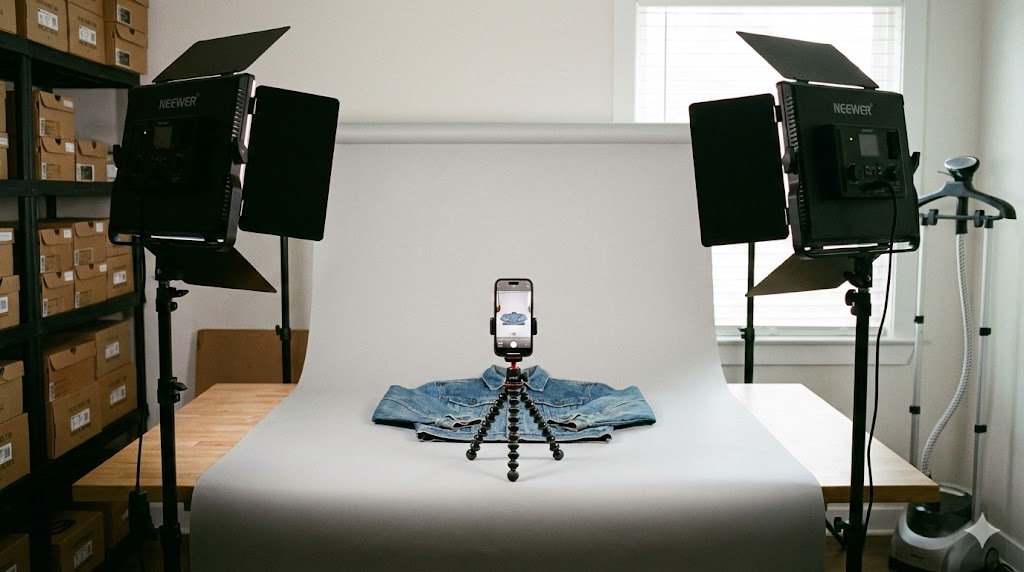
In the world of e-commerce, your photos are your sales pitch. If your lighting is yellow or your backgrounds are cluttered, you are leaving money on the table. The “Operator” goal for reseller photography gear is to create a setup that produces consistent, high-quality results with zero setup time.
The Dual-Light Standard: Neewer LED Panels
The biggest mistake new sellers make is relying on overhead room lights. This creates harsh shadows and inconsistent colors. The professional standard is a dual-light setup. I use the Neewer LED Video Light Kit because it provides two dimmable light sources on adjustable tripods.
By placing one light at 45 degrees on each side of your item, you effectively “cancel out” shadows. These panels also feature adjustable color temperature (3200K to 5600K), allowing you to match the lighting to the time of day and maintain a perfect white balance. This means less time spent editing and more time spent listing.
Small Items? Use a Dedicated Light Box
For jewelry, watches, or small electronics, a light box is a game-changer for your reseller photography gear kit. I recommend the PULUZ Portable Photo Studio. It is a self-contained cube with built-in LEDs that provides a perfectly diffused, 360-degree light environment. It folds flat when not in use, making it ideal for operators with limited space.
The Backdrop: Simple, Neutral, Versatile
You don’t need a thousand-dollar studio. A simple, light gray material attached to a sturdy board is the ultimate multi-tool. Lean the board against a wall for “lay flat” clothing photos, or drape the material across a table to create a “seamless” look for larger items. Gray is often superior to white because it doesn’t “wash out” light-colored items and provides a professional, high-end feel that stands out in search results.
The Best Camera is in Your Pocket
While many suggest expensive DSLRs, the modern iPhone is the superior choice for most resellers. It is faster, easier to use, and allows you to upload photos directly to your listing app without transferring files. The iPhone’s built-in computational photography handles exposure and focus automatically, ensuring your reseller photography gear remains lean and efficient.
The Secret Sauce: Batch Photography
The real efficiency hack isn’t just the gear—it’s the workflow. Never take photos for one item and then go list it. Instead, batch your photography. Take all your shirt photos, then all your pants, then your hard goods. Switching between different types of items breaks your rhythm and requires you to move your lights and backdrops. By batching, you keep your “production line” moving at maximum speed.
Reseller Photography FAQ
Do I really need two lights?
Yes. A single light source creates deep shadows on one side of your product. Using two lights provides even illumination that makes your items look professional and trustworthy to buyers.
Why use a gray background instead of white?
While white is traditional, a neutral gray is easier to light and prevents “blown-out” highlights on white or light-colored products. It also provides a modern aesthetic that helps your listings pop.
How do I fix yellow-looking photos?
Yellowing is usually caused by incorrect white balance. Ensure your LED panels are set to “Daylight” (usually around 5000K-5600K) and turn off any warm overhead household lights.
Should I use a tripod for my iPhone?
Absolutely. Even with modern stabilization, a tripod ensures every shot is crisp and identical in framing, which is essential for a consistent “brand” look across your store.
Final Verdict: Build Your Factory
Consistency is the hallmark of a professional reseller. By investing in the right reseller photography gear—specifically the Neewer LED panels and a dedicated light box—you remove the variables that cause slow listing times. Set up your station once, master the batching rhythm, and watch your “Production Line” soar.